YATCO BOSS users—we’ve updated one of your most valuable tools to better reflect how you actually use it. What was previously called, “My Marinas” is now officially “Saved Yachts.” While the name has changed, the functionality you rely on remains just as powerful—and we’re making it even easier to track and manage your sales prospects with this simple but strategic tool.
What is the Saved Yachts Feature?
This feature allows brokers to create folders of yachts for sale that they’re saving either for themselves or for individual clients. Think of it as your digital workspace—where you can keep tabs on current listings, monitor withdrawn or off-market yachts, and quickly send professional reports and emails to clients.
Even if a yacht is marked as N/A or withdrawn, you’ll still see it inside your folder—helping you maintain full visibility and historical context.
Why Use Saved Yachts?
- Stay Organized: Save multiple folders, each labeled for a specific client, interest, or category.
- Track Inventory Changes: View active, removed, or withdrawn yachts you’ve bookmarked.
- Easily Share: Generate a branded email or printable report directly from the folder view.
- Stay Efficient: Add yachts instantly as you browse listings or use the bookmarking feature.
How to Use Saved Yachts
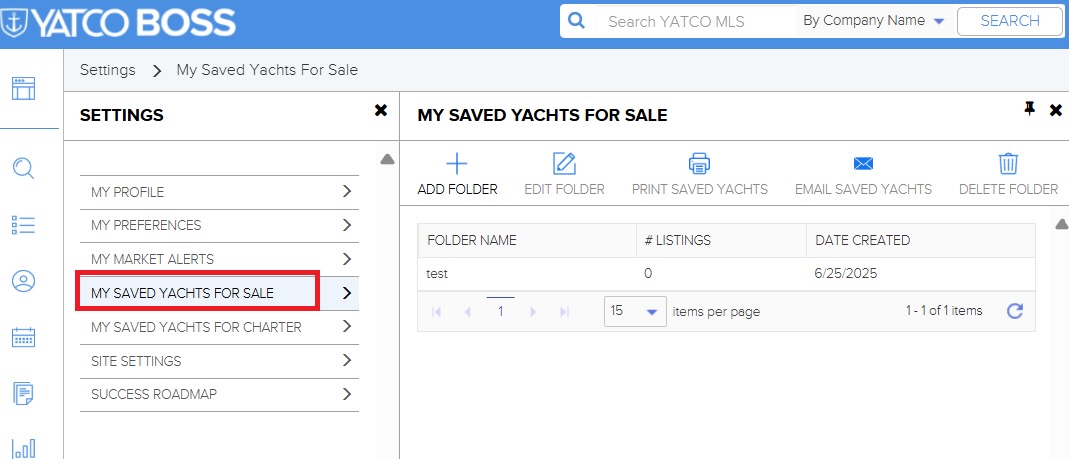
Option 1: Through Settings
- Log in to your YATCO BOSS dashboard.
- Click on the top right corner and go to “Settings.”
- Select “Saved Yachts (formerly My Marinas)” under Yachts for Sale.
- Select “My Saved Yachts” and hit the “+” sign to create a new folder. to create a new folder.
- Give the folder a name—like a client’s initials or a project—and click “Save.”
- Begin adding yachts directly from listings.
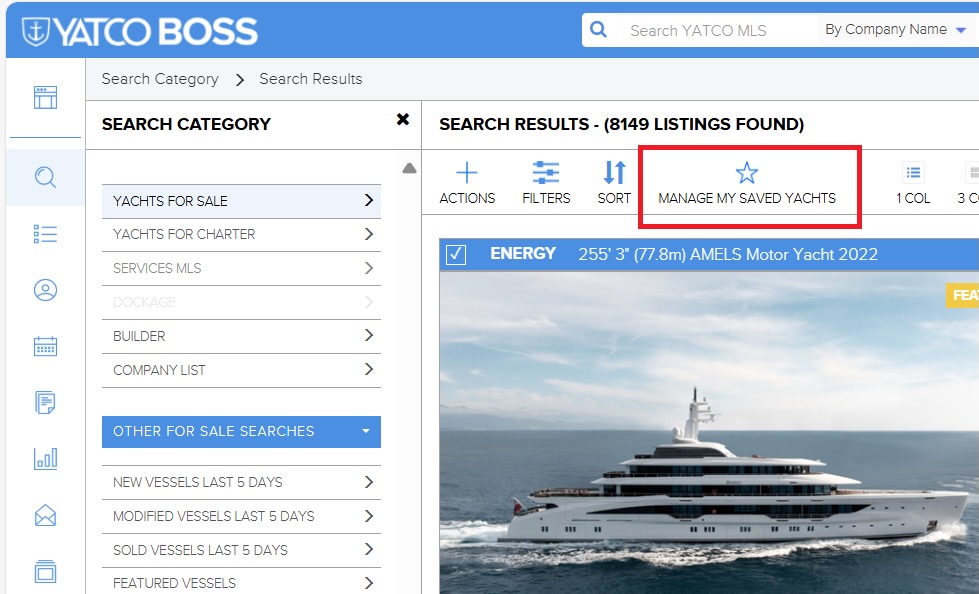
Option 2: From a Yacht Listing
- When viewing a yacht, click the star icon labeled “My Saved Yachts.”
- Choose the folder to save it to.
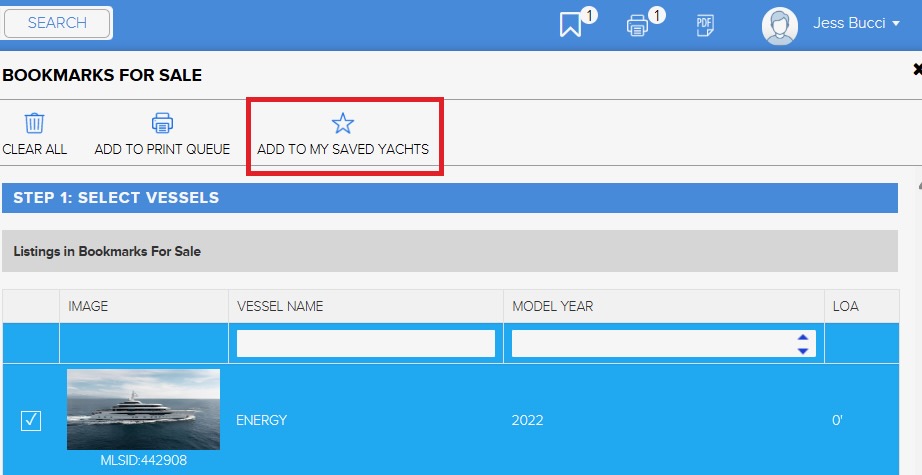
Option 3: Bookmark & Organize Later
- Bookmark yachts as you browse.
- Later, go to your Bookmarks and click “Add to My Saved Yachts.”
- Assign them to the appropriate folder(s).
Pro Tip: Share Reports in Seconds
From any folder inside “Saved Yachts,” you can:
- Click “Print” to create a polished, branded PDF;
- Click “Email” to send selections with your contact info and logo;
- Consider using the Multiline Report option for easy-to-read, summary-style presentations—perfect for clients who want a quick snapshot.
Start Organizing Smarter Today
Whether you’re actively sending selections to clients or keeping an eye on market availability, “Saved Yachts” gives you a clear, reliable way to manage your sales flow—all within YATCO BOSS.
No more digging through emails or re-running searches. Everything is saved, sorted, and ready to go.